 Easy BACnet
Why can't I find my BACnet IP devices?
Updated 11 October 2026
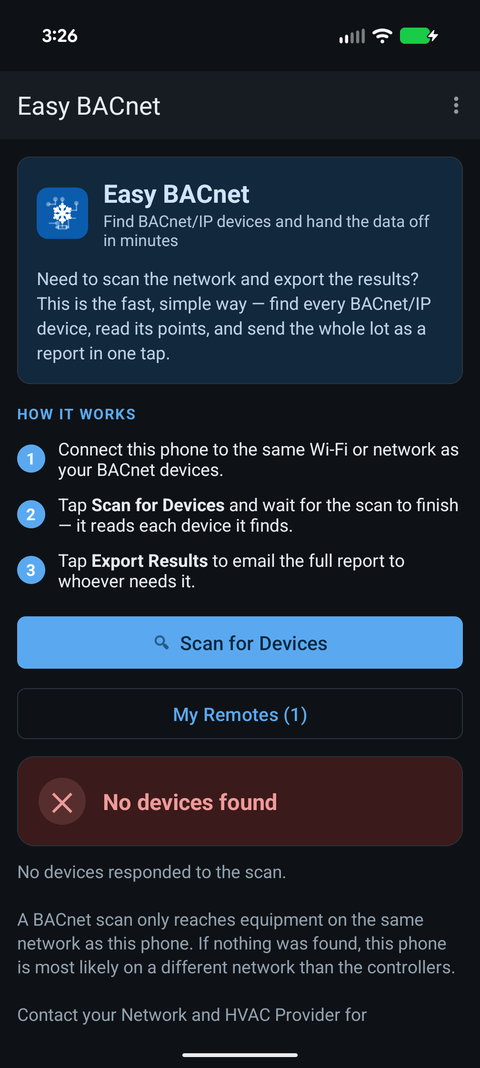
Usually because your phone isn't on the same network as the equipment. A scan can only see devices on the network you're connected to, and building controls often have their own separate network, not the office or guest Wi-Fi. So first make sure you're on the right one. If you are, check that BACnet IP is actually turned on in the device, because some ship with it off. A quick ping tells the two apart: if the device answers a ping but not a scan, BACnet IP is probably off. If it doesn't answer at all, you're probably on the wrong network.
Check these in order
1. Are you on the right network?
Your phone has to be on the same network as the equipment. Building controls usually have their own network, separate from the office and guest Wi-Fi, so being on the building's Wi-Fi isn't enough. Ask whoever runs the site which network the controls are on. If there's no controls Wi-Fi, plug in: a USB-C Ethernet adapter into a spare port on the controls switch (often inside the JACE or supervisory panel) gets you there.
A quick check: Easy BACnet shows your phone's IP address on the scan screen.
Compare it with a controller's IP from its label, its display or the site drawings.
On most sites the first three numbers should match: a phone on 10.20.30.250 can find
a controller on 10.20.30.41, but not one on 192.168.1.41. An address starting
169.254 means the network didn't hand you an address at all, which is
common on controls networks; you'll need a static address from the controls
contractor. See what is a subnet, and why doesn't the switch
give me the right one?
2. Is BACnet IP turned on in the device?
Plenty of controllers ship with BACnet IP switched off, or set up for MS/TP wiring only. In the device's setup (its web page, display or the manufacturer's tool), check that BACnet IP is enabled, that it uses the standard port 47808, and that it has a Device ID. If you don't have access to that, it's a job for the controls contractor.
3. Does the device answer a ping?
Easy BACnet has a ping tool right on the "No devices found" screen: type the controller's IP address and tap Ping.
- It answers: the network is fine. The problem is the device itself, so check step 2.
- No answer: you're probably on the wrong network (step 1), or the device is switched off or unplugged. Some devices ignore ping, so also check its power and the link light on its network port.
More on this in is my BACnet device online?
4. Is it on a different subnet?
If the ping worked but the device's address doesn't match your phone's (step 1), a normal scan can't reach it. Use Add device by IP… to go straight to it, or enter the site's BBMD if it has one (see below).
Still nothing?
Some Wi-Fi networks block the kind of traffic a scan uses, or have a firewall between networks. If Easy BACnet says devices only answered when contacted directly, that's what is happening, and a wired connection on the controls switch fixes it. Otherwise, it's time to call IT or the controls contractor with your phone's IP address.
If you find some devices but not others
- They're on another subnet. The ones you found share your subnet; the missing ones are behind a router. Add one by IP, or register with the site's BBMD (below).
- A whole MS/TP trunk is missing. MS/TP devices answer through their BACnet router, showing a network number and MAC instead of their own IP. If every device on a trunk is missing, look at the router or the trunk itself (wiring, baud rate, a duplicate MAC). That's a controls job.
- The device is down. Check power and the link light first.
- Two devices share a Device ID. One can seem to vanish, or the two trade places between scans. Easy BACnet warns about duplicates after a scan. See duplicate Device IDs.
If a device shows no name or no points
It answered the scan, but reading its details is failing or slow. Give a large controller a minute, then back out and open it again. A device behind a busy MS/TP router can take a while. If the scan marks it needs commissioning, it's reporting Device ID 4194303, which isn't a valid ID, and it needs setting up before anything can address it reliably.
Reaching devices on another subnet
Two options in the menu (three dots, top right):
- Add device by IP… contacts one controller directly. It goes straight to that address, so it works across routers as long as the phone can reach it (a ping is a quick way to check).
- BBMD for remote networks… registers the phone with the site's BBMD as a foreign device so scans reach the subnets it serves. Get the BBMD's address from whoever manages the controls network.
Check it on your own network. Easy BACnet is a free Android app that finds BACnet IP devices and reads their points in a couple of taps.
Get it on Google Play