 Easy BACnet
Is it safe to write to a BACnet point?
Updated 11 October 2026
Reading doesn't change anything. Writing commands live equipment. A write to a commandable point sits in its priority array and holds until someone releases it. If you know the point, write at a sensible priority (normally 8) and release when you're done, it's routine work. Commanding points you don't understand on an occupied building can upset comfort, waste energy or trip equipment. Easy BACnet keeps write mode off until you turn it on, and turns it off again every time the app starts.
Reading
Scanning, browsing points, reading values and exporting only request information; nothing in the controllers changes. Two cautions still apply. Reading every point on a big site adds traffic, and an MS/TP trunk behind a router is slow, so don't keep re-reading thousands of points through a busy router. And on someone else's network, get permission before you plug in and scan.
What a write does
If you command AHU-1 SF-C On, the fan starts. If you command an OA damper
to 100%, it opens. On a commandable point the value stays in its priority slot until
someone clears it, through schedule changes, power cycles of the head-end, and you leaving
site. That's how BACnet commanding is meant to work, and it's also why forgotten overrides
are the most common mess techs leave behind.
Not every point is commandable. Many AVs used as setpoints have no priority array: a write just replaces the value, the priority is ignored, and there's nothing to release. The only way back is to write the old value again, so note it before you change it.
How to write responsibly
- Read and note first. Confirm the device, the point name and the current value, and whether it's commandable (the point screen shows Commanded At for commandable points).
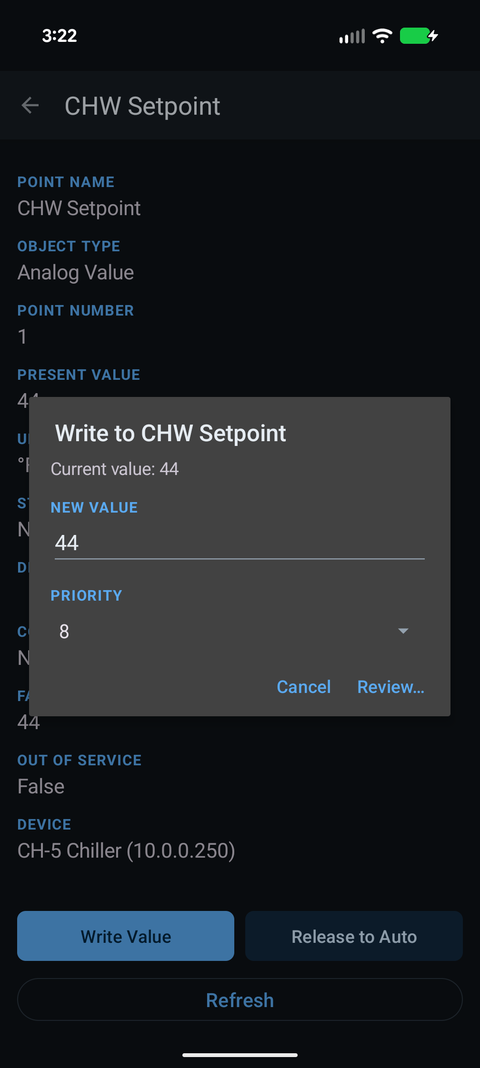
- Use priority 8 unless you have a reason not to. It's the conventional manual operator level: above the program, which usually writes at 10–16, and below life safety (1–2), critical equipment (5) and minimum on/off (6). Don't use 1 or 2.
- Change one thing at a time and watch the equipment respond.
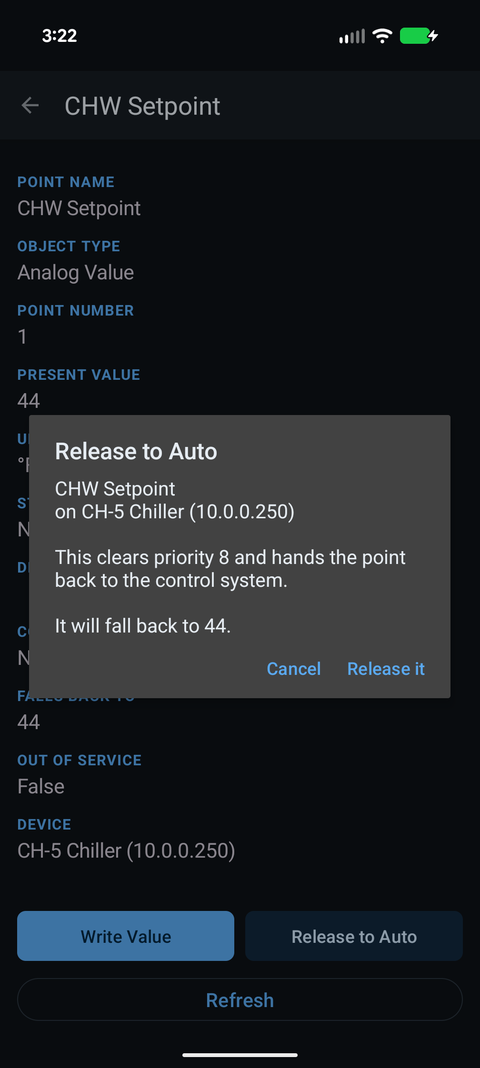
- Release when finished and check Commanded At shows the program back in control. The Session write log in the main menu lists everything you wrote.
- Clear it with whoever runs the building. On an occupied or critical site, commanding a point is an operational change. Check with the controls contractor or facility staff first.
Where it goes wrong
- Occupants and process. Overriding a setpoint or fan in an occupied space, a lab, a grow room or a data hall has immediate effects.
- Equipment. Forcing a valve or damper against the sequence can waste energy, freeze a coil on a cold day, or short-cycle a compressor.
- Inputs. A write to an AI or BI is ignored unless Out_Of_Service is true. Putting an input out of service to force it means the sequence runs on your fake value until someone sets it back.
- The forgotten override. The command was fine; leaving it in place is what caused weeks of a unit “not working right.”
What Easy BACnet does to help
Write mode is off by default and turns off every time the app starts. On the point screen every write shows a confirmation with the old value, the new value and the priority before anything is sent (on a custom remote, minus/plus, a toggle and a multi-state pick act at once; a button and a release ask first), and the app re-reads the point afterwards so you see what actually happened. On an input it warns you that the write will be ignored unless the point is out of service. Release to Auto is on the same screen. The judgement is still yours.
Check it on your own network. Easy BACnet is a free Android app that finds BACnet IP devices and reads their points in a couple of taps.
Get it on Google Play