
The app can't find what I'm looking for — what do I do?
Nine times out of ten it is one thing: your phone is not on the same network as the equipment. Turn off mobile data, join the building's Wi-Fi (or plug the phone into the controls network with a USB-to-Ethernet adapter), and scan again. If that is not it, work down the checklist below for whichever problem you have.
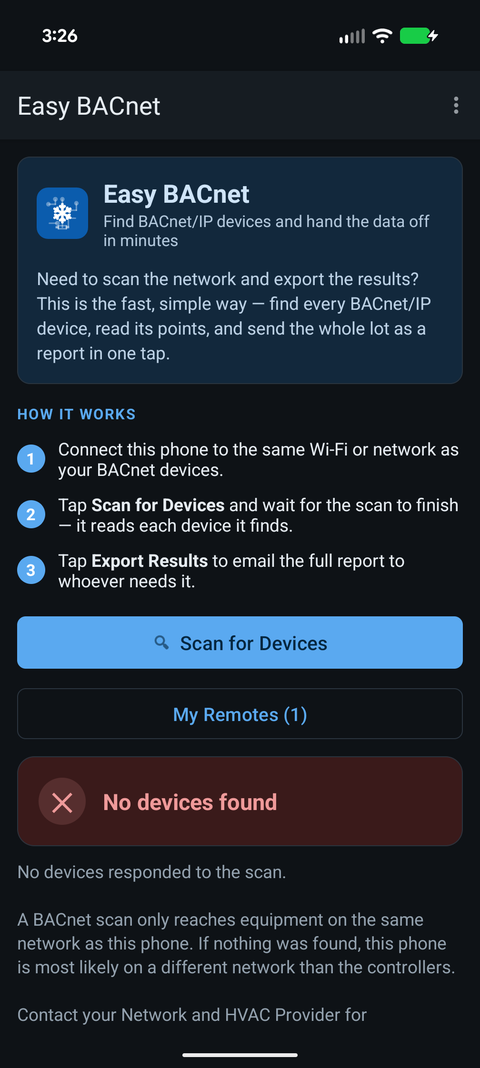
Pick the line that matches what you are seeing.
The scan finds nothing at all
You tapped Scan for Devices and got the red No devices found banner. In order, easiest first:
- Turn off mobile data. If the phone can reach the internet over cellular, it may not bother using the Wi-Fi you need. Swipe down and switch mobile data off, leave Wi-Fi on, scan again.
- Check which Wi-Fi you are on. It has to be the same network as the equipment. A "guest" Wi-Fi almost never is — guest networks deliberately hide everything else on them. Ask whoever runs the site which network the controls are on.
- If there is no Wi-Fi near the equipment, that is normal in a plant room. You need a USB-to-Ethernet adapter: plug it into the phone, run a network cable from the adapter to the same switch the controllers are on, and scan again.
- Try again a couple of times. Wi-Fi quietly drops the kind of "shout to everyone" message a scan uses. The app already repeats it for about 45 seconds, but a second scan sometimes catches what the first missed.
- Move closer / onto the wired side. A weak Wi-Fi signal loses these messages first.
If none of that works, the devices are very likely on a different part of the network that does not forward these messages to where you are plugged in. That is a real thing in bigger buildings and it is not a fault in the app — whoever manages the network can tell you which segment the controls live on, or point you at the right switch. See why can't I find my BACnet devices for the technical version.
It finds some devices, but not the one I want
- Look by number, not just name. Every device shows a Device ID and an IP address under its name. The unit you want might have a blank or unhelpful name but the right ID. See BACnet Device IDs explained.
- The one you want may be on another segment. Same cause as finding nothing — some devices answer because they are near you, while the missing one sits behind a router that is not forwarding to your spot. Being plugged into the same switch as that specific unit fixes it.
- It may simply be powered down or unplugged from the network. Worth checking before assuming it is the app.
I opened a device but it shows no points
- Give it a moment. The app reads points one at a time so it works with every controller, so a big unit can take up to a minute. Watch for the "Loading points" progress.
- Back out and open it again. A single dropped reply can stall the list; reopening starts it fresh.
- Some small devices genuinely expose very little — a sensor might have only one or two points. That is the device, not a failure.
I see a point but no value (it shows a dash, or "none")
- Tap Refresh. The value is read live; one miss shows a dash until the next read.
- Not every point has a live value. Some are settings or status the device does not report as a number, and a dash is the honest answer.
- If a whole device suddenly shows dashes, it has stopped answering — it may have lost power or dropped off the network. Scan again to confirm it is still there.
Still stuck?
Note the Device ID or point you were after and tell whoever looks after the building system. Almost every "can't find it" comes down to which network the phone is on, and they will know the answer for their site in seconds.